AI Assistant NEW
Ask questions about your inspections by voice or keyboard. Get instant answers about PASER scores, defect counts, account contacts, and repair scopes — without clicking through screens.
The leading pavement inspection software for paving contractors, property managers, and HOA management companies — AI-powered PASER scoring, Google Maps measurements, and client-ready reports from any device.
PavementIQ turns field inspections into AI-scored PASER reports, client-ready PDFs, and winning proposals — all from your phone in the parking lot.
Watch the full demo — 60 seconds
Built for pavement professionals who need to move fast and impress clients.
Ask questions about your inspections by voice or keyboard. Get instant answers about PASER scores, defect counts, account contacts, and repair scopes — without clicking through screens.
Push inspections directly to HubSpot as deals with PASER score, issue count, and report link attached automatically.
Photograph a pavement defect and get an instant PASER score 1–10 with distress classification and repair scope, powered by trained AI.
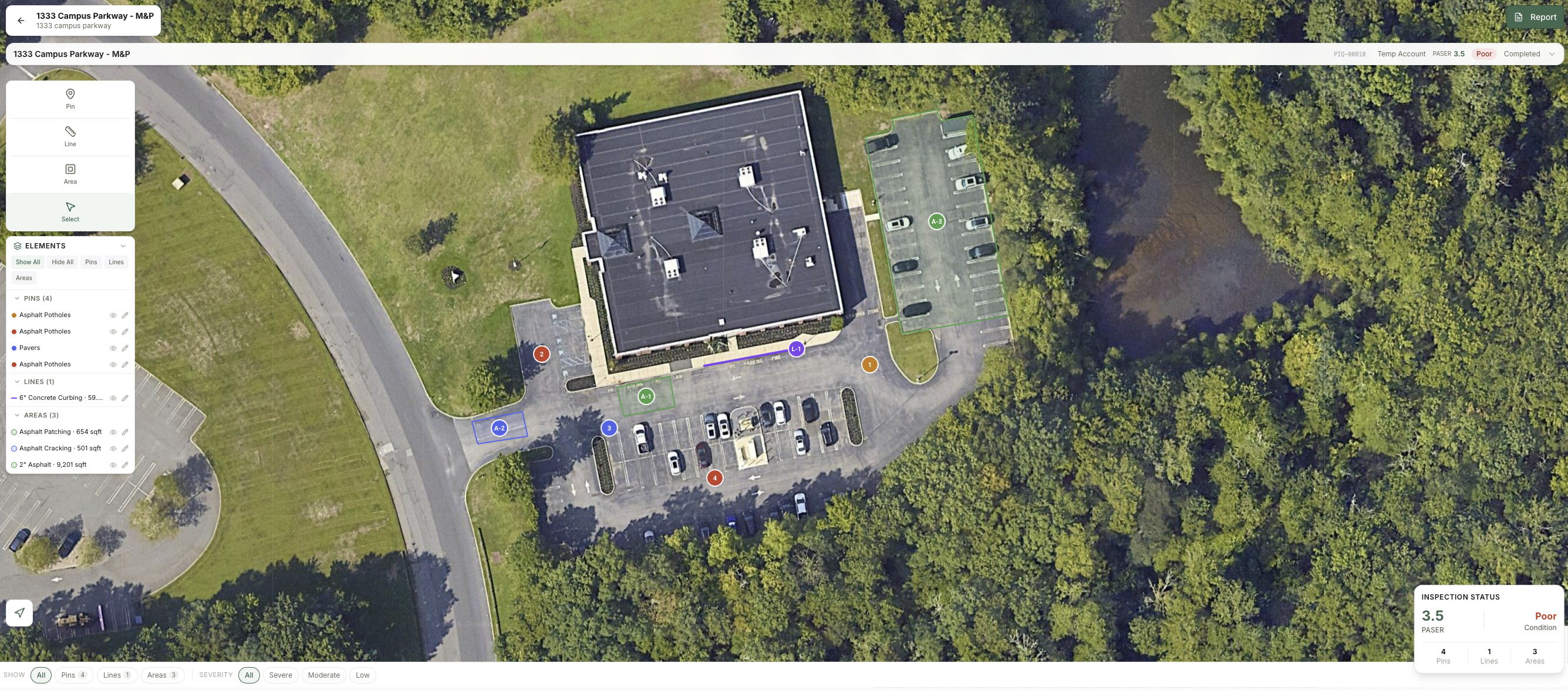
Draw pins, lines, and areas directly on Google Maps satellite imagery. Square footage and linear footage calculated automatically. Points are draggable — reposition any pin, line vertex, or area corner after placing it. Measurements update automatically.
Speak your field observations. AI structures them into professional client notes, internal notes, severity, and dimensions automatically.
Send clients a live report link in one tap. They see PASER scores, photos, AI findings, and measurements without needing an account.
AI generates a prioritized multi-year maintenance plan from your inspection data with recommended scope and cost estimates per item.
One-click reports with PASER ratings, AI executive summary, site photos, measurements, and repair recommendations. Client-ready instantly.
Asphalt, concrete, drainage, curbing, sidewalks, striping, and signage, all in one inspection with the right rating system for each.
New Feature
The PavementIQ AI Assistant knows every inspection, account, location, and defect in your organization. Ask anything. Get answers in seconds — by voice or keyboard.
Ask it anything
Available on Premium and Ultra plans
Start free — try the assistant today →Trained on PASER methodology, ASTM distress standards, and real-world pavement data. PavementIQ's AI thinks like a senior engineer.
Create a new inspection, search the address — Google Maps centers on the property in satellite view instantly.
Drop numbered pins, draw measurement lines, outline areas. Footage calculates live. Snap photos from your rear camera.
Tap "Analyze with AI" on any photo. Get PASER score, distress type, and repair scope in seconds.
Export a branded PDF or send a live client portal link. Professional report delivered before you leave the site.
PASER (Pavement Surface Evaluation and Rating) is a 1–10 visual assessment scale developed by the University of Wisconsin–Madison. PavementIQ speaks the same language as your clients' engineers.
Install to your home screen
No app store required. Open PavementIQ in Safari or Chrome and tap Add to Home Screen. It launches full screen like a native app — fast, offline-capable, and always up to date.
PASER (Pavement Surface Evaluation and Rating) is a 1–10 visual assessment scale developed by the University of Wisconsin–Madison. PavementIQ's AI analyzes your field photos and automatically assigns a PASER score based on detected distress types, coverage, and severity — the same methodology used by DOTs, municipalities, and engineers nationwide.
Yes. PavementIQ is built mobile-first and works on any iPhone or Android including iPads. It uses your device's rear camera for photo and video capture, supports touch drawing on Google Maps satellite view, and includes voice notes — all optimized for field use.
PavementIQ detects 14 distress types: alligator cracking, block cracking, longitudinal cracking, transverse cracking, rutting, potholes, edge cracking, raveling, birdbaths, settlement, concrete spalling, scaling, drainage failures, and ADA compliance issues including trip hazards over ¼ inch vertical displacement.
Inspectors draw lines and polygons directly on Google Maps satellite view. PavementIQ uses Google's Geometry library to calculate linear footage for lines and square footage plus square yardage for areas in real time as you draw. Measurements update live as you drag vertices and are saved to the report automatically.
Free gives you the core inspection workflow — Google Maps, measurements, photo capture, pins/lines/areas, and basic PDF reports — with no AI features and no credit card required. Premium ($19/user/month) adds AI photo analysis (100/mo), AI voice notes (200/mo), AI inspection reports (30/mo), client portal share links, HubSpot integration, and branded reports. Ultra ($29/user/month) adds unlimited AI usage across all features, the AI maintenance scheduler, scope cost estimator, multi-location portfolio dashboard, white-label reports, API access, and unlimited team members.
Yes on Premium and Ultra. Every inspection can be shared as a PDF export or as a live client portal link — a branded view-only page your client accesses without creating an account, showing the PASER score, AI findings, site photos, measurements, and recommended scope of work.
Complete an inspection and instantly create a Company, Contact, and Deal in HubSpot — with PASER score, issue count, and report link attached automatically.
No more emailing PDFs. Share a branded, interactive report portal with your client in one tap — PASER rating, photos, AI findings, and measurements all included.
Walk the lot and talk. AI instantly structures your voice observations into category, severity, dimensions, and repair notes — ready for the report before you leave the parking lot.
Every inspection generates a professional report with PASER rating, AI executive summary, repair recommendations, photos, and measurements. Export PDF or send a share link instantly.
Ready to close more paving jobs?
From inspection to HubSpot deal in under 5 minutes.
Start free. Upgrade when you need AI. Less than CompanyCam — does 10x more.
Slide to see pricing for your team size
Free
$0
per user / mo
$0
total / mo
Premium
$19
per user / mo
$57
total / mo
Ultra
$29
per user / mo
$87
total / mo
All paid plans include a 14-day free trial · No credit card required
All paid plans include a 14-day free trial · No credit card required · Questions? Contact us
Start free — includes a 14-day Premium trial. No credit card required.